# Git: How to fetch a branch from the upstream to the local repo in 5 steps
Hello Fellow CodeNewbies 👋,
I am collaborating with a friend to create a project in React.
I created a repo for the project, and my teammate forked this repo.
## Background
Recently, I created a branch to make some changes. Then I pushed this branch to the remote repo and created a pull request.
I asked my teammate to fetch this branch and test things out locally before merging it into the `main` branch.
After making sure that we didn't have anything to fetch and merge from the remote repo, and after several attempts, we still couldn't fetch the branch from the remote repo.
We mostly got the error of `fatal: couldn't find remote ref `.
Then we tried to step back and figure things out.
From my teammate's side, my repo is the `upstream` repo. He then forked this repo, which automatically becomes his `origin` repo.
For him to fetch a branch — that hasn't been merged to `main` — from the `upstream` repo, his `origin` repo should have access to the `upstream`.
So, we need to set the `origin` repo to point to the `upstream` repo.
### 📝 Important Side Notes
My teammate and I started this project with one of us creating a repo and the other forking the repo.
But for collaborating, we could do it differently, which I will cover in another blog post.
We found out later that what we're doing is an **open-source** workflow, where we maintain and contribute to a repo. In this case, I am the maintainer, and my teammate is the contributor.
However, we learned a lot from this *accident*.
So, I hope you can gain something too from our journey! 😄
## Fetch a branch from the `upstream` repo
1. Check our current configured remote repo for our fork.
```bash
git remote -v
```
If we haven't configured a remote that points to the `upstream` repo, we will get:
```bash
origin (fetch)
origin (push)
```
2. Add a new remote `upstream` repo that will be synced with the `origin` repo.
```bash
git remote add upstream
```
`original-repo-url` is the HTTPS URL of the repo that we fork.
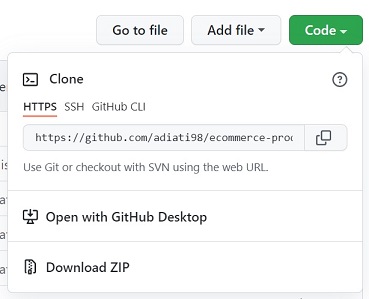
We can copy this link by going to the repo on GitHub, clicking the green button with "Code" written on it, and copying the HTTPS link.
3. Check if the new `upstream` has now been added.
```bash
git remote -v
```
Now we should get:
```bash
origin (fetch)
origin (push)
upstream (fetch)
upstream (push)
```
4. Fetch data from the `upstream`.
```bash
git fetch upstream
```
You will see in the command line that we have fetched the branches on the `upstream` repo, including the target branch.
5. Navigate to the branch.
```bash
git checkout branch-name
```
Running this command will automatically create a branch with the same name in our local repo.
Now you have the branch on your local repo, and you can test it out locally! 😄
---
Thank you for reading!
Last but not least, you can find me on [Twitter](https://twitter.com/AdiatiAyu). Let's connect! 😊