# How To Make Changes On A Commit In A Pull Request Directly On GitHub's Website
Hello Fellow Codenewbies 👋,
Not long ago I worked on an issue on a markdown file. After I finished working on it, I pushed a commit and created a pull request.
Then I realized that I missed something, and had to make a fix.
Panicking, my first thought was to close the pull request. Then make the changes locally, push the new commit and create a new pull request.
But in the end, I didn't do that. After asking around, I got an answer. There is a way to make changes directly on [GitHub's website](https://github.com/).
Also, we don't have to close and open a new pull request whenever we want to fix something and commit the changes.
## Steps To Make Changes On GitHub
1. **Go to the pull request**
On the repo on GitHub, click the `Pull request` tab, and open your pull request.

2. **Go to the (last) commit**
Under the title of your pull request, there are several tabs. Click on the `commits` tab and open the commit.
If you have several commits, open the last commit.

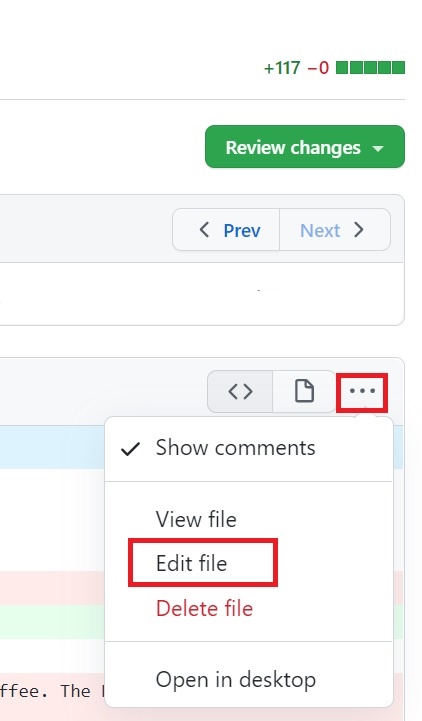
3. **Edit file**
Click the `...` (three dots) button under the commit's message on the right side. It will give you a drop-down, then click `Edit file`. Now you can make your changes there.
4. **Commit changes**
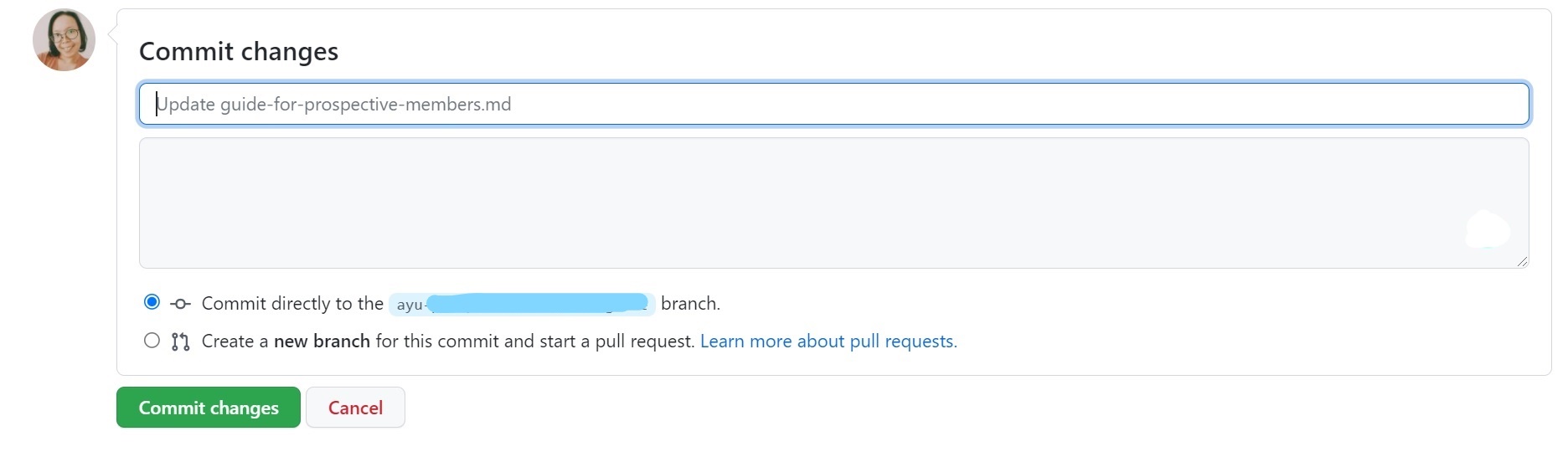
Now you're done with making the changes. Scroll down to the bottom of the page until you see `Commit changes` input. Write your commit message, and choose one of the two committing options.
- Commit directly to the `your-project` branch.
- Create a new branch for this commit and start a pull request.
Then click the `Commit changes` button.
And that's it! Now you have made the changes with a new commit 😊.
## Final Words
You can make changes to any type of file directly on GitHub. But unlike markdown, you cannot preview your changes on GitHub.
If you need to run tests and preview the project from files that are not markdown, the best way is to make changes locally. Then push the new commit.
---
Thank you for reading!
Last but not least, you can find me on [Twitter](https://twitter.com/AdiatiAyu). Let's connect! 😊