
Git: How to fetch a branch from the upstream to the local repo in 5 steps

A
Ayu is a tech blogger, open source contributor & maintainer, and tech community enthusiast based in the Netherlands. She loves photography and iced coffee!
Search for a command to run...
Ayu is a tech blogger, open source contributor & maintainer, and tech community enthusiast based in the Netherlands. She loves photography and iced coffee!
Thanks a lot. It was really helpful.
I was trying to figure this all out from the last two hours. And you made me understand it in less than 5 minutes
Thank you! I'm glad to hear that it helps you 😊
Thanks for reading! 🙂
Hi friends 👋, I've been writing tech blog posts for a few years now. If you don't know me yet, English is my second language. My mother tongue is Indonesian, and I'm also surrounded by Dutch every da

I frequently receive messages from enthusiastic contributors who have completed 2 or 3 high-quality pull requests (PRs) in just 1 month. They’re proactive, their work is top-tier, and they’ve handled

A few months ago, I shared a story about building an automated open source portfolio using just my smartphone and an AI assistant while on vacation. My main goal was to stop the "spreadsheet struggle"

Recently, I read Bekah Hawrot Weigel’s blog post, "When 'Local' Went Global: The Pandemic Era of International Communities." As someone active in many online communities, I found it a bit sad, but I agree with her points and think they apply to open ...

Hacktoberfest is almost over. How has your contribution journey been so far? Are you confident about contributing to open source projects, or are you still struggling to find your way? If you're new to open source and still feel overwhelmed, that's c...

Hello Fellow CodeNewbies 👋,
I am collaborating with a friend to create a project in React.
I created a repo for the project, and my teammate forked this repo.
Recently, I created a branch to make some changes. Then I pushed this branch to the remote repo and created a pull request.
I asked my teammate to fetch this branch and test things out locally before merging it into the main branch.
After making sure that we didn't have anything to fetch and merge from the remote repo, and after several attempts, we still couldn't fetch the branch from the remote repo.
We mostly got the error of fatal: couldn't find remote ref <branch-name>.
Then we tried to step back and figure things out.
From my teammate's side, my repo is the upstream repo. He then forked this repo, which automatically becomes his origin repo.
For him to fetch a branch — that hasn't been merged to main — from the upstream repo, his origin repo should have access to the upstream.
So, we need to set the origin repo to point to the upstream repo.
My teammate and I started this project with one of us creating a repo and the other forking the repo.
But for collaborating, we could do it differently, which I will cover in another blog post.
We found out later that what we're doing is an open-source workflow, where we maintain and contribute to a repo. In this case, I am the maintainer, and my teammate is the contributor.
However, we learned a lot from this accident.
So, I hope you can gain something too from our journey! 😄
upstream repoCheck our current configured remote repo for our fork.
git remote -v
If we haven't configured a remote that points to the upstream repo, we will get:
origin <fork-repo-url> (fetch)
origin <fork-repo-url> (push)
Add a new remote upstream repo that will be synced with the origin repo.
git remote add upstream <original-repo-url>
original-repo-url is the HTTPS URL of the repo that we fork.
We can copy this link by going to the repo on GitHub, clicking the green button with "Code" written on it, and copying the HTTPS link.
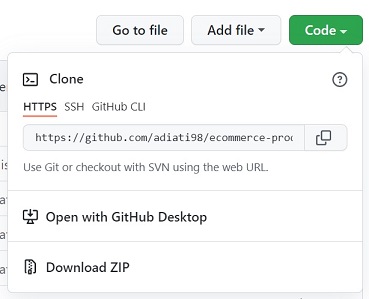
Check if the new upstream has now been added.
git remote -v
Now we should get:
origin <fork-repo-url> (fetch)
origin <fork-repo-url> (push)
upstream <original-repo-url> (fetch)
upstream <original-repo-url> (push)
Fetch data from the upstream.
git fetch upstream
You will see in the command line that we have fetched the branches on the upstream repo, including the target branch.
Navigate to the branch.
git checkout branch-name
Running this command will automatically create a branch with the same name in our local repo.
Now you have the branch on your local repo, and you can test it out locally! 😄
Thank you for reading!
Last but not least, you can find me on Twitter. Let's connect! 😊