
How to Install pnpm with npm on Windows 11
A
Ayu is a tech blogger, open source contributor & maintainer, and tech community enthusiast based in the Netherlands. She loves photography and iced coffee!
Search for a command to run...
Ayu is a tech blogger, open source contributor & maintainer, and tech community enthusiast based in the Netherlands. She loves photography and iced coffee!
No comments yet. Be the first to comment.
Hi friends 👋, I've been writing tech blog posts for a few years now. If you don't know me yet, English is my second language. My mother tongue is Indonesian, and I'm also surrounded by Dutch every da

I frequently receive messages from enthusiastic contributors who have completed 2 or 3 high-quality pull requests (PRs) in just 1 month. They’re proactive, their work is top-tier, and they’ve handled

A few months ago, I shared a story about building an automated open source portfolio using just my smartphone and an AI assistant while on vacation. My main goal was to stop the "spreadsheet struggle"

Recently, I read Bekah Hawrot Weigel’s blog post, "When 'Local' Went Global: The Pandemic Era of International Communities." As someone active in many online communities, I found it a bit sad, but I agree with her points and think they apply to open ...

Hacktoberfest is almost over. How has your contribution journey been so far? Are you confident about contributing to open source projects, or are you still struggling to find your way? If you're new to open source and still feel overwhelmed, that's c...

Hey Friends 👋,
Not long ago, I contributed to one of Virtual Coffee's repositories. I had to install pnpm because we no longer use yarn. After I installed pnpm with npm and ran it, I got this error message:
pnpm: The term 'pnpm' is not recognized as a name of a cmdlet, function, script file, or executable program.
Check the spelling of the name, or if a path was included, verify that the path is correct and try again.
So I googled and searched around for answers. In one of my findings, others got this error. After researching and trying things, I could install and use pnpm on my machine.
Depending on the pnpm's version, you might encounter it or not. But I'm writing this article for those facing the same issue to make the installation process smoother.
Fun Side Note:
I wanted to know the difference between npm, yarn, and pnpm. So I threw a question on Twitter and opened a discussion on DEV Community that you might want to check out.
pnpm:npm install -g pnpm
Add the path for pnpm to the system environment in your machine.
Click the start button at the bottom bar.
Search for "system environment" and click "Edit the system environment variables" — it opens the "System Properties" dialog box.
In the "Advance" tab, click the "Environment Variables..." button at the bottom.
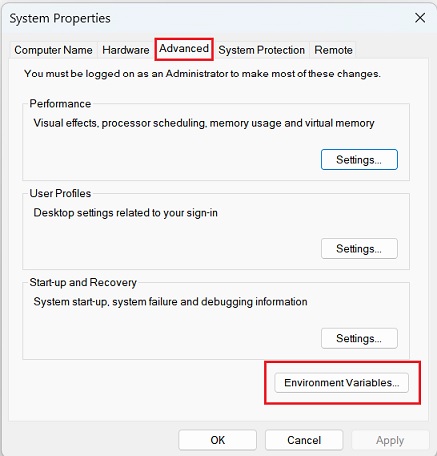
Double-click "Path" in the "User variables for username" on top, and check if you already have %PNPM_HOME%. If you don't, add it by clicking the "New" button on the right side and input it.

In the "User variables for username", click the "New..." button — it opens the "New User Variable" dialog box.
In the "Variable Name", type PNPM_HOME. And in the "Variable Value", type the path C:\Users\username\AppData\Local\pnpm. Change the username to your computer's username.
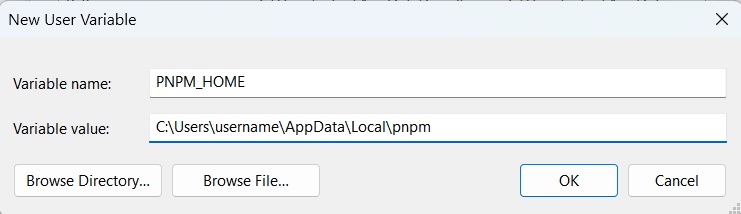
Do the same steps to add the variable name and value in the "System variables" at the bottom.
To write this tutorial, I uninstalled the pnpm dependency. I deleted all the pnpm paths in my machine to reproduce the problem. And I found that in the newer version of pnpm, we don't need to set up the path. Updating the pnpm version and globally installing it would fix the problem. Alternatively, you can install the pnpm using a standalone script.
However, this article will be helpful if you still want to install pnpm with npm and encounter the same problem even after updating the version or installing it globally 😊.
🖼️ Credit cover image: undraw.co
Thank you for reading! Last, you can find me on Twitter, Mastodon, and BlueSky. Let's connect! 😊